Getting started
Run a sandbox payment gateway, make your first paid request, and see the 402 handshake end to end.
This is your first contact with stablecoin-gated endpoints: HTTP routes that reply 402 Payment Required instead of 200 OK until the caller attaches a signed stablecoin transfer. No login, no API key, no monthly invoice — the request itself carries proof of payment.
Two commands give you a full local picture: one starts a paywalled API, the other calls it and pays.
Agent summary
pay --sandbox server demoruns a local gateway with a bundled spec;pay-demo.yamlis written to the current directory.pay --sandbox curl ...issues the request, handles the 402 challenge, and replays with a payment proof.- Sandbox mode uses an ephemeral wallet on hosted Surfpool — no real funds move.
- The 8-step flow below is the canonical mental model. Every other page in this section is a variation of it.
Run the demo
Open two terminals.
Terminal 1 — start the gateway:
pay --sandbox server demoThe command writes pay-demo.yaml (a sample paywall spec with metered endpoints, splits, and tiered pricing), binds to 127.0.0.1:1402, and opens the embedded debugger at http://127.0.0.1:1402/.
Terminal 2 — call a metered endpoint:
pay --sandbox curl http://127.0.0.1:1402/api/v1/reports/usageThe same URL without pay returns 402 Payment Required. With pay, the wallet signs a $0.01 USDC transfer on the sandbox network and the request retries automatically.
What just happened
The exchange below is the pull-mode flow — the simplest variant of the 402 handshake and the one pay curl uses by default. The client signs an authorization locally; the gateway broadcasts the on-chain transfer when it accepts the request. (Push mode, where the client submits the transfer itself, comes up later when we cover MPP sessions.)
The interesting parts:
- Step 2 — the gateway never blocks waiting for payment; it answers immediately with a challenge that names the amount, recipient, and a server-issued nonce. The connection ends there.
- Step 3 — the client signs a transfer authorization locally and replays the exact same request with an
X-PAYMENTheader. No round-trip to Solana, no waiting on confirmation. - Steps 4–5 — the gateway is the one that talks to the chain. It broadcasts the signed transfer and waits for confirmation before forwarding upstream. A bad proof never reaches your origin.
The three phases
Steps 1–2 are the challenge. The gateway tells the client what payment it expects.
Step 3 is the proof. The client signs a transfer authorization and replays the request — no on-chain step on the client side.
Steps 4–6 are the settlement. The gateway submits the transfer, waits for confirmation, then returns the paid response.
Inspect the flow live
The demo gateway ships with a debugger UI that records every challenge, proof, retry, and forward as they happen. Open http://127.0.0.1:1402/ after running pay server demo and re-run the curl command — each flow appears as a row, and selecting one shows the timeline, payment splits, and raw events on the right.
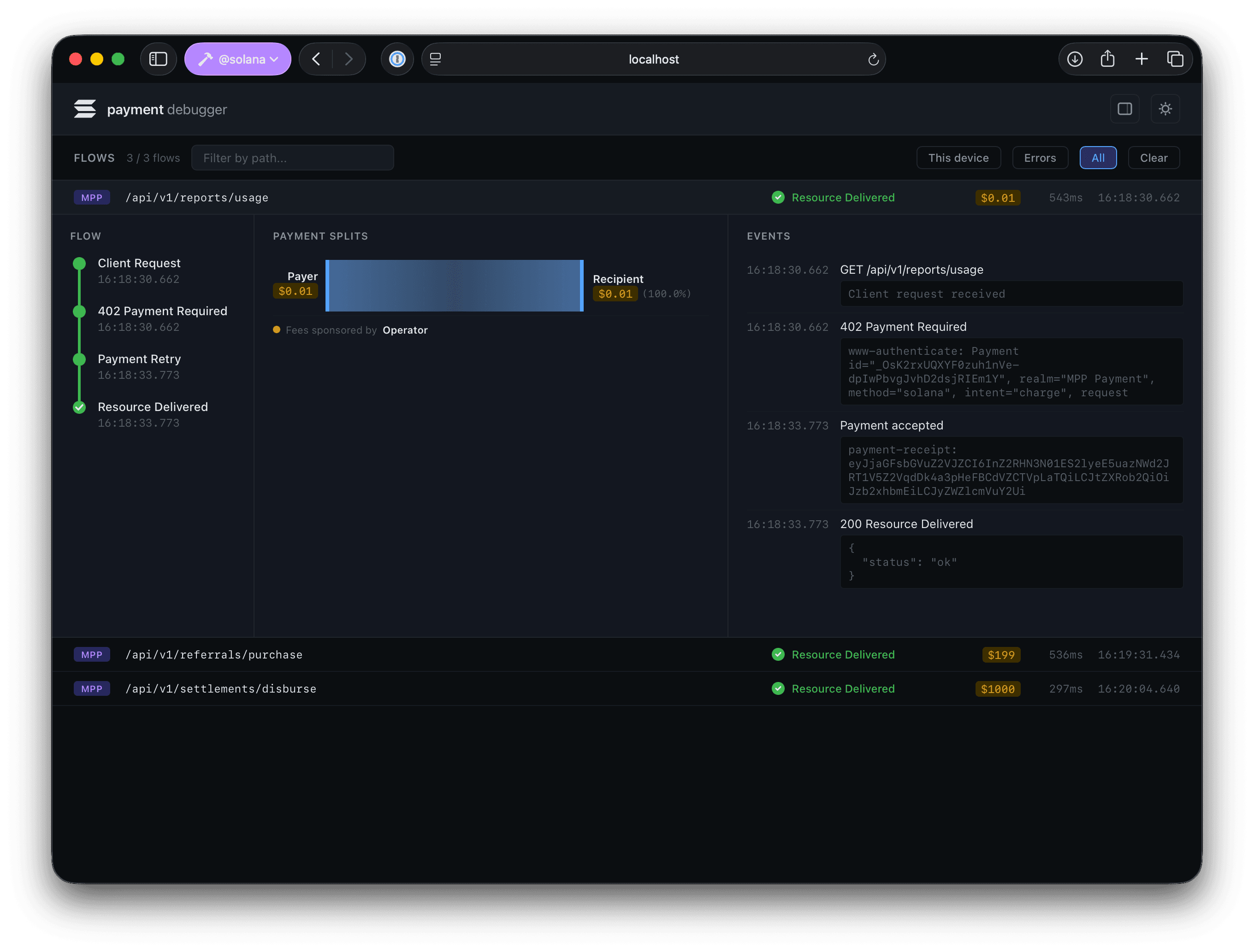
pay --sandbox --debugger curl http://127.0.0.1:1402/api/v1/reports/usageThe --debugger client flag adds extra trace headers so the debugger can correlate the client side of the exchange with what the gateway saw.
Next steps
- Define pricing — request, token, character, page, or volume-tiered pricing in a paywall spec.
- YAML Specification — unpack the full paywall YAML shape and start from a runnable starter spec.
- Deployment — run pay on Vercel or Terraform-backed Cloud Run with Docker, secrets, and production signing.